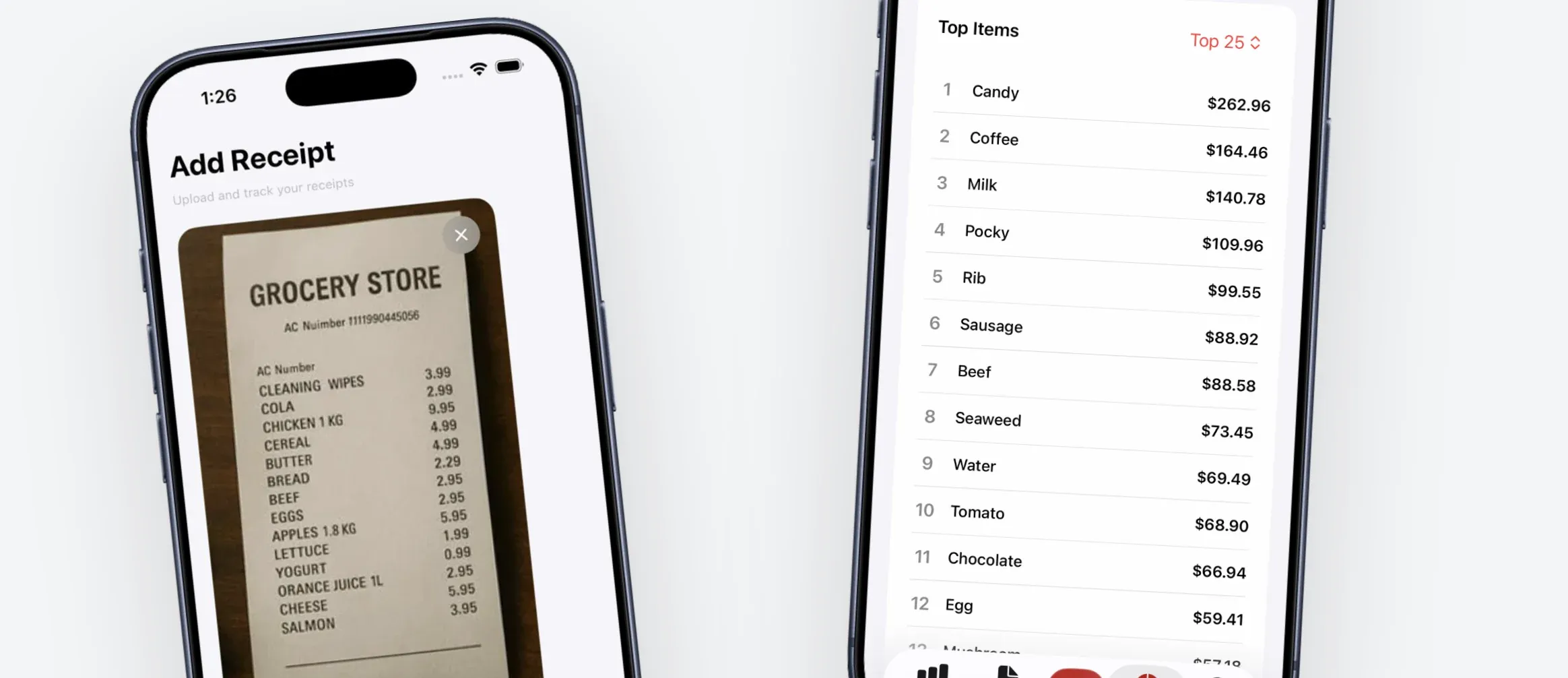
The best grocery budget apps in 2026 are Groceries Tracker (best for receipt scanning and item-level tracking), YNAB (best for whole-budget control), and GoodBudget (best free envelope budgeting for couples). Most apps track total grocery spending, but only Groceries Tracker breaks each receipt down to individual items so you can see exactly what's driving your bill.
Last month, I realized I'd downloaded and deleted four different grocery budget apps in the past year. Every time, the same thing happened: I'd use it for a week, get annoyed by something, and go back to guessing how much I was spending on food.
So I decided to actually commit this time. I picked 6 of the best grocery budget apps in 2026 and used each one for real shopping trips. Some had receipt scanning, some had item-level tracking, one was basically a sticky note on my phone. If you just want a quick way to log your spending without committing to an app, you can try this free grocery expense tracker. But if you want the full breakdown, here's what I found after 30 days of testing them all.
Feature Comparison
| App | Receipt Scanning | Item Detail | Price Tracking | Sharing | Free Tier |
|---|---|---|---|---|---|
| Groceries Tracker | Yes | Yes | Yes | Yes | Yes |
| YNAB | No | No | No | Yes | 34-day trial |
| EveryDollar | No | No | No | No | Yes (limited) |
| Fudget | No | No | No | No | Yes |
| GoodBudget | No | No | No | Yes | Yes (10 envelopes) |
| Credit Karma | No | No | No | No | Yes (fully free) |
Why You Quit the Last One
Be honest - you've probably tried a grocery budgeting app before and stopped using it. I've been there multiple times. Usually it's one of a few things: the app wanted you to manually type in every transaction, which gets old after about two weeks (I know, because that's exactly when I stopped). Or it gave you a total - "you spent $800 on groceries" - but no item-level breakdown, so you couldn't actually do anything with that information. Or it was really just a general budget app that lumped groceries into one line item, even though a single grocery trip is produce, meat, snacks, drinks, household stuff, and whatever you impulse-grabbed near checkout. One number doesn't capture any of that. And then there's the worst one: you tracked your grocery spending for two weeks, and nothing happened. No insights, no moment where you went "oh, that's where it's going." Just data entry that led nowhere.
What Makes a Good Grocery Budget App?
After testing all six, these are the things that actually matter. Not the marketing bullet points - the stuff that determines whether you're still using the app a month from now:
- Receipt scanning: This is the single biggest differentiator. A grocery receipt scanner that actually works means you snap a photo and you're done. No receipt scanning means you're typing things in, and you will eventually stop.
- Item-level tracking: There's a huge difference between "you spent $180 at the store" and "you spent $42 on snacks." One is information. The other actually changes how you shop.
- Grocery price tracking: Prices keep creeping up. An app that tracks price changes over time helps you spot when your usual items get more expensive and shop smarter.
- Household sharing: If your partner also does grocery runs, you both need to see the same numbers. Otherwise you're only tracking half the picture.
- Speed: If it takes more than 60 seconds after a shopping trip, you'll stop. I've tested this on myself - anything longer and I'd just say "I'll do it later" and never do it.
The Best Grocery Budget Apps in 2026
1. Groceries Tracker
Best for: Item-level grocery insightsVerdict: The only grocery expense tracker here that breaks spending down to the item level automatically. Scanned my first receipt in about 10 seconds.
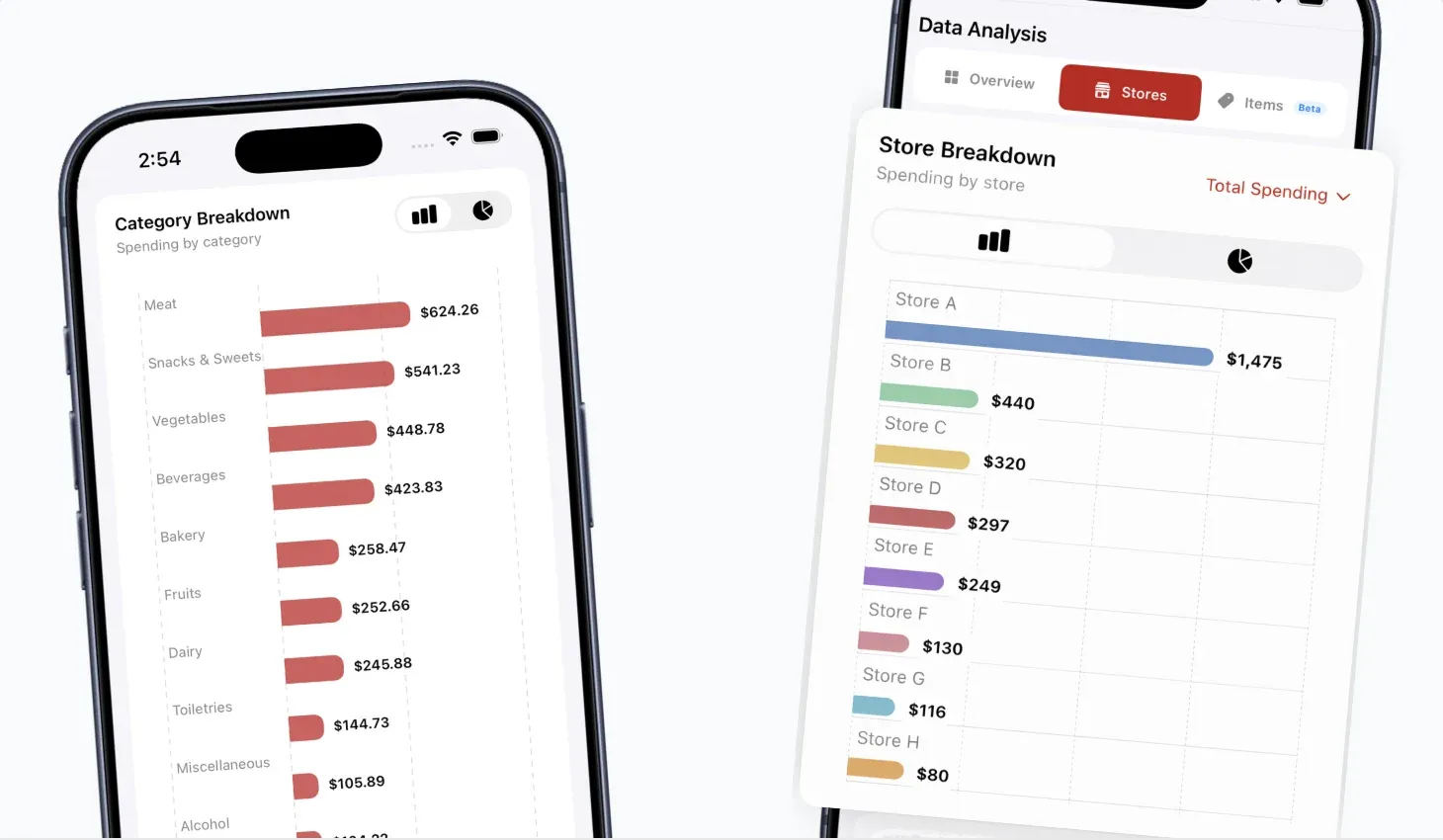
This is the one I ended up sticking with. You scan your grocery receipt after each trip, and it reads every item, sorts it into categories (produce, dairy, snacks, meat, etc.), and tracks your grocery spending over time. The first time I scanned a receipt and saw my full breakdown, I genuinely didn't realize how much I was spending on drinks.
After a few weeks, I could see that $120 of my monthly groceries was snacks, $95 was beverages, and my trips to one store were consistently 15% more expensive than another. That kind of item-level detail is something none of the other apps here can do.
It also supports household sharing, so my partner and I both scan receipts and everything lands in the same dashboard. The free grocery budget calculator on the site is worth trying if you're not sure what your budget should even be.
The feature I didn't expect to use is Savings Goals. It compares your monthly grocery total against the benchmark for your household size and country, and any month you come in under, the surplus credits toward a goal you set. A trip, an emergency fund, a new appliance. The other apps here track what you spend. This is the only one that ties coming in under budget to something you actually want to fund.
One thing I'll note: the app's category suggestions aren't always perfect. It occasionally mislabels items (it put a cleaning spray in "snacks" once), and you have to manually fix those. It's quick to correct, but if you're someone who needs things to be accurate without any intervention, that might bug you.
- Scan receipts and get item-level categorization automatically
- See spending trends by category, store, and time period
- Share with your household - everyone scans, everyone sees the data
- Grocery price tracking across different stores
- Free plan with no time limit, no credit card required

2. YNAB (You Need a Budget)
Best for: Full financial controlVerdict: Excellent if you want to control your entire budget, but it treats groceries as one number. No receipt scanning, no item-level detail.
I'll say it: YNAB is probably the best overall budgeting app out there. The envelope budgeting system really works - you assign every dollar a job before you spend it, and it changes how you think about money. I get why people swear by it.
But for tracking grocery spending specifically? It's frustrating. Groceries are just one category. After a $200 Costco trip, YNAB just shows "$200 - Groceries." No item breakdown, no way to know if that was mostly produce or mostly impulse snacks. And there's no grocery receipt scanner - every transaction is either manual entry or a bank sync that shows up a day or two later.
Also, $14.99/month is steep. It's worth it if you use it for your entire financial life. But if you mainly care about grocery budgeting, that's a lot to pay for a single category line.
- Zero-based budgeting methodology
- Bank account syncing
- Goal tracking and reporting
- $14.99/month (34-day free trial)
;%20}%20.cls-4%20{%20clip-path:%20url(%23clippath);%20}%20%3c/style%3e%3cclipPath%20id='clippath'%3e%3crect%20class='cls-1'%20x='0'%20width='133.2'%20height='24'/%3e%3c/clipPath%3e%3clinearGradient%20id='linear-gradient'%20x1='745.93'%20y1='-195.37'%20x2='6270.74'%20y2='-1936.59'%20gradientTransform='translate(0%2026)%20scale(1%20-1)'%20gradientUnits='userSpaceOnUse'%3e%3cstop%20offset='0'%20stop-color='%230073b9'/%3e%3cstop%20offset='1'%20stop-color='%230091d9'/%3e%3c/linearGradient%3e%3c/defs%3e%3cg%20class='cls-4'%3e%3cg%3e%3cpath%20class='cls-2'%20d='M23.92,0v23.92H0V0h23.92ZM15.75,14.05h-3.87l2.48,4.22h4.01l-2.62-4.22ZM10.35,14.05h-3.62v2.98h3.62v-2.98ZM6.72,5.69v7.4h5.87c1.68-.01,2.22-.18,2.64-.36,1.52-.64,1.97-2.36,1.97-3.35s-.46-2.7-1.97-3.35c-.42-.19-1.37-.34-2.61-.35h-.2s-5.69,0-5.69,0Z'/%3e%3cpath%20class='cls-2'%20d='M11.93,8.04c.62,0,1.67.09,1.67,1.32v.15c-.07,1.18-1.17,1.21-1.75,1.19h-1.5v-2.66h1.58Z'/%3e%3cpath%20class='cls-3'%20d='M92.21,2.99c2.86,0,5.11.74,6.97,2.14l.21.16-2.41,3.39c-1.59-1.11-3.34-1.71-4.88-1.71-1.12,0-1.69.45-1.74,1.03v.08s0,.05,0,.05c0,.79.6,1.14,3.01,1.68,3.93.85,6.4,2.1,6.5,5.21v.19s0,.05,0,.05c0,3.54-2.82,5.65-7.05,5.65-2.98,0-5.82-.9-7.94-2.67l-.22-.19h0s2.69-3.2,2.69-3.2c1.72,1.36,3.64,2.08,5.65,2.08,1.24,0,1.93-.41,1.99-1.1v-.1s0-.05,0-.05c0-.72-.57-1.11-2.94-1.66-3.65-.82-6.47-1.84-6.58-5.25v-.2s0-.05,0-.05c0-3.22,2.56-5.55,6.75-5.55ZM69.93,3.29l4.17,6.72,4.16-6.72h5.11v17.35h-4.81v-9.97l-4.46,6.8h-.11l-4.43-6.74v9.91h-2.98l-1.76-4.1V3.29h5.11ZM56.85,3.16l7.42,17.47h-5.18l-1.27-3.1h-6.73l-1.24,3.1h-1.43l-2.26-3.29,6.02-14.18h4.66ZM120.43,3.29l3.58,6.32,3.61-6.32h5.41l-6.63,10.78v6.57h-4.85v-6.49l-6.63-10.86h5.51ZM112.5,3.29l2.48,4.09h-8.68v2.63h7.65v3.79h-7.65v2.75h8.9v4.09h-13.69V3.29h10.97ZM38.14,3.29c2.67,0,4.51.69,5.68,1.88.97.94,1.49,2.2,1.54,3.78v.25s0,.05,0,.05c0,2.57-1.33,4.31-3.39,5.24l-.19.09,4.17,6.04h-5.58l-3.51-5.25h-2.11v5.25h-4.84V3.29h8.24ZM54.49,8.87l-1.96,4.93h3.91l-1.95-4.93ZM37.89,7.45h-3.16v4.16h3.19c1.59,0,2.52-.73,2.59-1.92v-.13s0-.05,0-.05c0-1.36-1-2.06-2.62-2.06Z'/%3e%3c/g%3e%3c/g%3e%3c/svg%3e)
3. EveryDollar
Best for: Simple, guided budgetVerdict: Really easy grocery budgeting for beginners. But the free version means typing everything in yourself, and there's no item-level tracking.
EveryDollar (from Ramsey Solutions) has the best onboarding I've seen. It walks you through building a monthly budget in maybe five minutes, and it puts grocery spending right up front. If you've never budgeted before, this is probably where I'd start.
The catch: it's the same story as YNAB. Grocery spending is tracked at the transaction level, not item level. The free version requires manual entry for everything, which got old fast. The premium version ($17.99/month) syncs with your bank, but that's even more expensive than YNAB for basically the same grocery tracking limitations.
- Guided budget setup
- Drag-and-drop interface
- Free version available (manual entry only)
- Premium: $17.99/month with bank sync

4. Fudget
Best for: Simplest possible trackerVerdict: A digital sticky note. You type numbers and subtract. That's it.
Fudget is barely an app. I mean that in the nicest way. You set a grocery budget, type in what you spent after each trip, and it subtracts. No categories, no bank connections, no analytics, no receipt scanning. I used it for a week and honestly it felt like using a calculator. If "I just need a number to subtract from" is genuinely all you want, Fudget does that. But after the second week, I wanted more and there was nowhere to go.
- Minimal, distraction-free interface
- Offline-first, no account required
- Free with optional premium ($1.99)

5. GoodBudget
Best for: Couples & familiesVerdict: The best envelope budgeting app for couples who share a grocery budget. Simple and it actually works for that use case.
GoodBudget does one thing really well: shared envelope budgeting. You create envelopes for different spending categories (groceries, dining out, etc.), put money in each one, and when the envelope's empty, you're done spending. Both partners can see and update the same budget on their own phones.
I liked how simple it was to set up, and the multi-device sync worked flawlessly. The free version gives you 10 envelopes, which is plenty for most people. But it's the same limitation as the others - your grocery envelope just shows a total. No item-level tracking, no receipt scanning, no way to know where within "groceries" the money actually went.
- Envelope-based budgeting
- Multi-device sync for couples
- Debt tracking tools
- Free (10 envelopes) or $10/month (unlimited)
6. Credit Karma
Best for: Free automatic trackingVerdict: Free and fully automatic, but it just shows you lump sums. If you were a Mint user, this is where you ended up.
After Intuit shut down Mint in March 2024, everyone got moved over to Credit Karma. It links to your bank accounts and categorizes transactions automatically, so your grocery spending shows up without you doing anything. And it's completely free.
The problem is that it's the least useful for actually saving money on groceries. A $200 Walmart trip just shows up as "$200 - Groceries." Was that mostly produce? Mostly snacks? You'll never know. I used it for the full month and the only thing I learned was how much I spent total, which I could've figured out from my bank statement. If you want a zero-effort overview and don't care about the details, it works. But it won't help you change anything.
- Automatic bank transaction import
- Spending categorization by merchant
- Completely free
- No item-level grocery tracking
Which App Should You Choose?
Skip the feature comparison for a second. Just pick based on who you actually are:
"I've tried apps before and quit them all."
Groceries Tracker. Scan a receipt, done. No typing, and you actually learn something about your grocery spending from day one.
"I want to control every dollar, not just groceries."
YNAB. Best overall budget app, hands down. Just don't expect grocery-specific insights.
"I've literally never budgeted before."
EveryDollar or GoodBudget. Both are great for grocery budgeting for beginners. Simple, guided, not intimidating.
"I just want to subtract my trips from a number."
Fudget. That's literally all it does. No learning curve, but no insights either. If you like that simplicity but want columns and formulas, try the free grocery budget spreadsheet instead.
"I don't want to do anything. At all."
Credit Karma. Free, automatic, but your grocery spending stays as one big number.
The Bottom Line
Here's what I took away from a month of testing: the best grocery budget app is whichever one you'll actually open after a shopping trip. That sounds obvious, but it's why most people fail. They pick the most impressive-sounding app instead of the one that fits how they actually shop.
If you've tried general budgeting apps and you still have no idea why your grocery bill is so high, the app was probably the wrong tool. A general budget app tells you the total. A grocery-specific app like Groceries Tracker shows you what's inside that total. And once you see it, saving money on groceries gets a lot less abstract.
Not sure what you should even be spending? Start with the free grocery budget calculator to get a realistic number. If you meal plan, the weekly meal budget planner can help you map out what to buy before you shop. Then pick the app that helps you stay under your number.
Want to see where your grocery money actually goes? Start Groceries Tracker free - no time limit, no credit card required.
Last updated: September 6, 2026