Grocery Receipt Scanner
Scan once. Know exactly what you spent.
Take a photo of any receipt and every item, price, and category is extracted in seconds. Works with paper receipts, PDF e-receipts, and digital confirmations from any store.
Your receipt
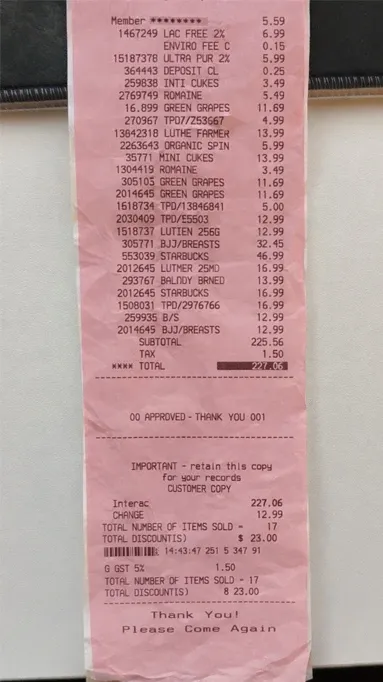
One paper receipt. Seventeen items, a few discounts, tax and a total.
Reading the receipt
Each printed line becomes an item with a clear name, a category and its price: LAC FREE 2% becomes Lactose-free milk in Dairy, $6.99.
In your history
$227.06
17 items
Saved $23.00
- Meat
- Vegetables
- Fruits
- Dairy
- and more
The totals and the savings come in with the items.
From paper to your history
Snap or upload your receipts
Use your phone camera, or upload several photos and PDFs at once from your phone or computer.
Every item and price is extracted
The receipt is read automatically and each item, price, and category is pulled out.
Items appear in your spending history
Everything is saved and ready for analysis, budgeting, and tracking.
Works on
- iPhone
- Android
- Web
Get it in
Three ways to get a receipt in.
Snap a photo with your phone right at checkout. Upload a PDF e-receipt from an online grocery order. Drag an existing file straight onto the dashboard from your desktop. Each input method fits a different habit, and all three end in the same place: a structured, searchable record of what you actually bought. Have a pile from the week? Pick them all and they go up in one batch, each showing its own progress as it is read.
Uploading 3 receipts
- Photo from your phone Read
- Online order confirmation Reading
- Photo from last weekend Waiting
Never type a grocery item again.
Every other receipt tracker either makes you type items into a form by hand or gives up on the details entirely. Groceries Tracker reads the receipt for you. Scan once, and every item, price, and category is already sitting in your history. The tedious part of tracking groceries is gone.
| On the receipt | In Groceries Tracker |
|---|---|
| LAC FREE 2% | Lactose-free milk$6.99 |
| INTL CUKES | Cucumbers$3.49 |
| ROMAINE | Romaine lettuce$5.49 |
| GREEN GRAPES | Green grapes$11.69 |
| ORGANIC SPIN | Organic spinach$5.99 |
| MINI CUKES | Mini cucumbers$13.99 |
| BJJ/BREASTS | Chicken breasts$32.45 |
Every line, sorted
Categorized in seconds, not minutes.
The moment a receipt finishes scanning, every line item is already sorted into a grocery category. Produce, dairy, snacks, household, and the rest. No tagging by hand. If a line needs a clearer name, fix it right on the receipt. Your spending history is already updated.
Sorted into categories
7 of 17 lines
- MeatChicken breasts$32.45
- VegetablesCucumbers, Romaine lettuce, Organic spinach, Mini cucumbers$28.96
- FruitsGreen grapes$11.69
- DairyLactose-free milk$6.99
Fix a line in a tap.
Scans are not perfect, and a store abbreviation is not always clear. Rename an item, change its category, or add one the scan missed. Your label is the name that shows up in your totals.
The totals come with it.
The subtotal, the tax, the total and the savings printed on the receipt are read too, so the money adds up the same way the paper does.
- Items
- 17
- Subtotal
- $225.56
- Tax
- $1.50
- Total
- $227.06
Saved on this receipt$23.00
Your receipts stay yours.
Every scan goes into your household's history and nowhere else.
- Shared only with people you invite.Your receipts are shared with your household, never with advertisers or data brokers.
- Never sold.We make money from subscriptions, not from your data.
- No ads.There are no ads anywhere in the app.
Who can see your receipts
- YouOwner of the household Can see
- SamInvited to your household Can see
- AdvertisersThere are no ads in the app Never
- Data brokersYour data is never sold Never
- iPhone
- Android
- Web
Snap at the checkout, check on your laptop
Scan with the app on iPhone or Android, or upload photos and PDFs on the web. Same household, same history.
People stick with Groceries Tracker
The spreadsheet got abandoned. This becomes part of the routine.
⭐⭐⭐⭐⭐ This app has genuinely changed the way we manage our grocery spending!
We had been fighting at home for months over how much we were spending on groceries, but since I started using Groceries Tracker and actually tracking the data, everything has completely changed - no more fights! 😂
Now we have a clear picture of where our money is going, can easily track our budget, and most importantly, hold ourselves accountable. Seeing the actual numbers makes such a difference.
It’s simple, useful, and genuinely making a difference for us. Highly recommend it! 👏
“Fairly new user, but works really well and is very handy for tracking expenses. What is really amazing is I flagged a bug, got an answer through mail a couple minutes later stating they were working on a fix. A couple hours later the fix was up and the bug fixed. Now that's how you do customer support.”
“I tried several apps, and AI actually recommended this one over most. What I love is how easy and addictive it is, when I'm at the grocery store, I just scan and upload, and I don't even take the receipt home anymore. It's become part of my routine. I love business startups, and I think this is a great product.”
“I just started using it about a month ago. It makes it so much easier to track my food expenses, especially when I buy at Costco where you can get more than food. I love that I just have to upload my bill and it automatically puts everything in categories with graphs with little editing. Very impressive!”
“The app is a valuable tool for keeping my budget at hand, especially these days with food prices changing so quickly. It has been fun watching the app evolve and the care and responsiveness of you and your team.”
Questions
What stores work with receipt scanning?
Any store. Trained on thousands of receipt formats from major chains, local grocery stores, farmers markets, and online delivery services.
Does it work with blurry or damaged photos?
Moderate blur, folds, and smudges are handled well. For best results, place the receipt on a flat surface with good lighting. If something is unreadable, you can manually edit those items.
Can I edit items after scanning?
Yes. After your items are extracted, you can edit names, prices, categories, or delete items before saving the receipt to your history.
Are PDF e-receipts supported?
Yes. You can upload PDF receipts from email confirmations, online grocery orders, or digital receipts from stores that offer them.
Can I upload several receipts at once?
Yes. Select several photos or PDFs together, on the web or in the app, and they upload as one batch. Each receipt shows its own progress and lands in your history as soon as it is read, so you can catch up on a week of shopping in one go.
How accurate is the scanning?
Accuracy varies by receipt quality, but most well-printed receipts see 90-95% accuracy on item names and prices. You can always review and correct before saving.
What if items are missing from the scan?
You can manually add any missing items directly in the receipt editor. The scanner keeps getting better with every correction you make.