Quick Answer: Top Picks by Use Case
Best overall
Groceries Tracker — lists, receipt scanning, and spending analytics in one app.
Best for families
OurGroceries — fastest real-time sync across multiple phones.
Best free option
Apple Reminders — already on your iPhone, zero setup, auto-categorized lists.
Best with price tracking
Groceries Tracker — auto-suggests prices from past receipts and compares planned vs actual.
The best grocery list apps in 2026 are Groceries Tracker (best for list + spending tracking combined), AnyList (best for clean shared lists with recipe integration), and OurGroceries (best for multi-device family sharing). Most grocery list apps only help you shop. Groceries Tracker also tracks what each item costs over time, so you can see where your money goes.
I tested all 7 apps for real grocery runs. Here's what each one does well, where it falls short, and which one fits the way you actually shop.
Feature Comparison
| App | Sharing | Price Estimates | Recipe Integration | Offline Mode | Free Tier |
|---|---|---|---|---|---|
| Groceries Tracker | Yes | Yes | No | Yes | Yes |
| AnyList | Yes | No | Yes | Yes | Yes (limited) |
| OurGroceries | Yes | Yes | No | Yes | Yes |
| Mealime | No | No | Yes | Yes | Yes (limited) |
| Listonic | Yes | No | No | Yes | Yes (with ads) |
| Out of Milk | Yes | No | No | Yes | Yes (with ads) |
| Apple Reminders | Yes (Apple only) | No | No | Yes | Yes (free) |
What Actually Matters in a Grocery List App
Here's what separates the good grocery list apps from the ones you'll delete in two weeks:
- Real-time sharing: Changes need to show up instantly on your partner's phone. Not "next time they open the app."
- Fast item entry: If adding "milk" takes more than 2 seconds, you'll stop using it.
- Smart autocomplete: The best apps suggest items before you finish typing and auto-categorize them.
- Price awareness: Knowing what your list will cost before you go changes how you shop.
- List vs receipt comparison: You planned 15 items, came home with 22. Only one app here actually shows you what happened.
The Best Grocery List Apps in 2026
1. Groceries Tracker
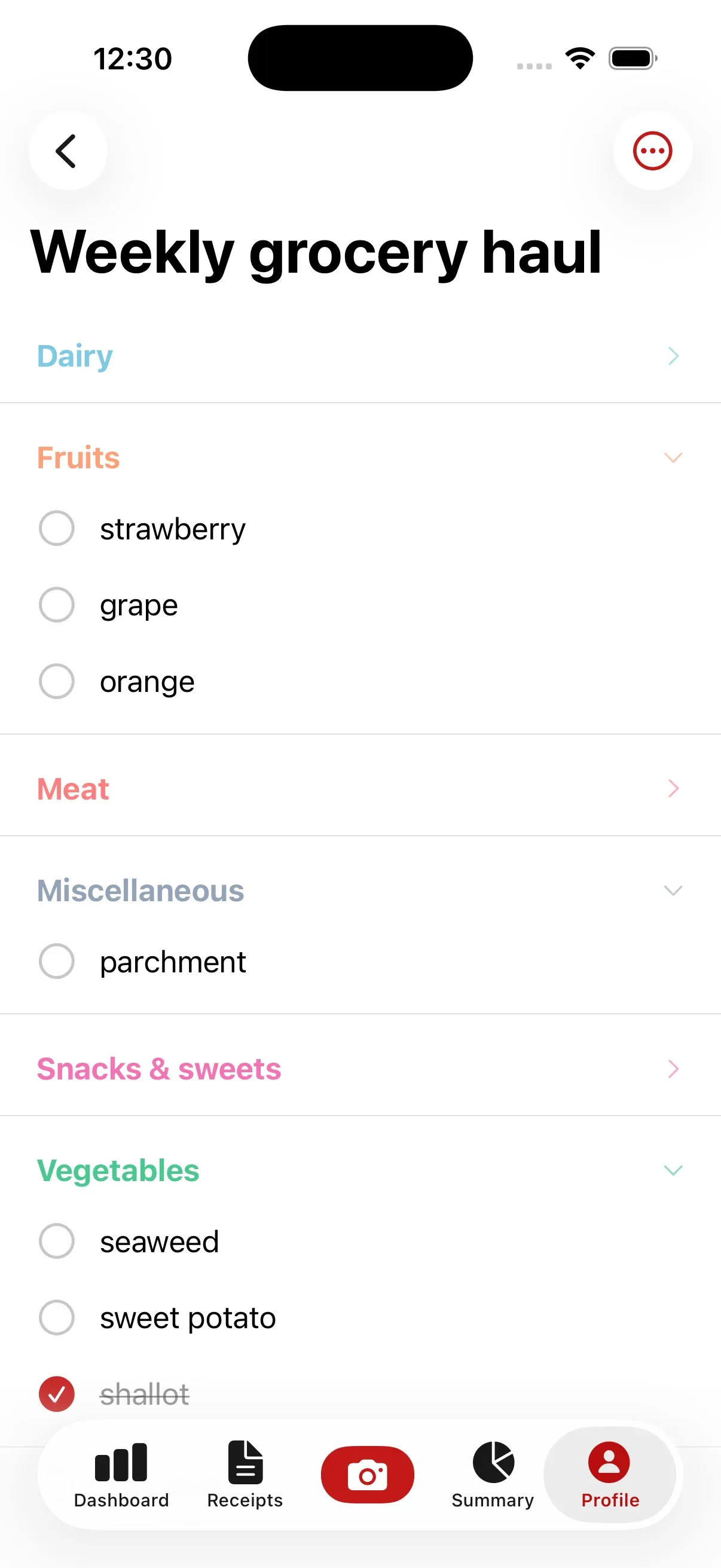
Best for: Lists + spending tracking in one placeVerdict: The only grocery list app that also tracks what you actually spent. Build your list, shop, scan the receipt, see how you did.
Building a list in Groceries Tracker is fast - start typing an item name and it fills in the rest, already sorted into the right category. No dragging, no manual organizing. Just type and add.
The standout feature: after you shop, compare your list against your actual receipt. See what you got, what you forgot, and what you impulse-bought - all in one view. No other app on this list does this. Your grocery list and spending data live in one place, so you always know where your money went. There's also a free budget calculator to help you set a realistic target before you shop.
Downside: no recipe integration yet, and if you just want a simple checklist, it might be more than you need. There's a free plan with no time limit, so you can see if the spending tracking side is worth it for you before paying anything.
- Smart autocomplete
- Compare planned list vs actual receipt after shopping
- Grocery list + receipt scanning + spending analytics in one app
- Household sharing - everyone sees the same list and data
- Free plan with no time limit, no credit card required
2. AnyList
Best for: Recipe-to-list meal planningVerdict: Best recipe-to-list workflow. Import a recipe, get a shopping list. Clean and polished.
AnyList lets you import recipes from any food blog, plan meals for the week, and generate a combined shopping list with one tap. It even merges duplicates - two recipes with onions become one line item. Sharing works well and the UI is polished.
Downside: no price tracking at all, and the free version is limited (no recipe imports or cross-device sync). Category sorting is manual. $12/year for premium.
- Import recipes from the web and generate shopping lists
- Meal planning with combined ingredient lists
- Clean, polished UI with shared lists
- $12/year premium, limited free version
3. OurGroceries
Best for: Families who need real-time syncVerdict: Best real-time sync for families. Fast and reliable, but the UI feels dated.
OurGroceries has the fastest real-time sync of any list app. Check off an item and it disappears from your partner's phone instantly. Adding items is quick with smart suggestions, and it supports price estimates per item.
Downside: the UI looks like 2018. No recipe integration, and the free version has ads. $5.99 one-time for premium.
- Best-in-class real-time sync across devices
- Fast item entry with smart suggestions
- Price estimates per item
- Free with ads, or $5.99 one-time premium
4. Mealime
Best for: Meal planners who hate grocery shoppingVerdict: A meal planner that generates grocery lists. Great for "what should I eat?" - not a general-purpose list app.
Mealime answers "what should I cook this week?" Pick recipes, and it generates a shopping list with exactly what you need. Portions are adjustable and the cooking instructions are solid.
Downside: you can only add items from their recipes - no custom items like "paper towels." No sharing, no price tracking. The free version limits recipe access.
- Meal planning with auto-generated grocery lists
- Step-by-step cooking instructions
- Dietary preference filters (vegan, keto, etc.)
- Can't add custom items outside of recipes
5. Listonic
Best for: Quick, no-setup shared listsVerdict: Fastest setup. Share a list in 30 seconds. Basic but it works.
Listonic gets you to a shared list faster than anything else - download, create, share a link, done. Has a "smart sort" that organizes items by store aisle and works offline reliably.
Downside: ads in the free version are annoying, and the feature set is basic - no price tracking, no receipt comparison. It's a checklist and nothing more. $2/month for premium.
- Fastest list sharing setup - no account needed for guests
- Smart sort by store aisle
- Works offline reliably
- Free with ads, premium $2/month
6. Out of Milk
Best for: Pantry trackingVerdict: Unique pantry tracking, but the app feels like it's on autopilot.
Out of Milk tracks what you have at home alongside what you need to buy. Check your pantry list before heading out so you don't buy a second bottle of olive oil. Also has a built-in to-do list for non-grocery errands.
Downside: hasn't been updated much recently. UI feels dated, ads are intrusive, and it's sluggish compared to newer apps.
- Pantry tracking to avoid buying duplicates
- Combined grocery and to-do lists
- List sharing with household members
- Infrequent updates, dated UI
7. Apple Reminders
Best for: iPhone users who want zero setupVerdict: Free, already on your phone, and better than you'd expect. But it's a baseline, not a grocery app.
Since iOS 17, Apple Reminders has a grocery list template that auto-sorts items by category. Siri integration means you can add items hands-free. Shared lists work through iCloud - as long as everyone's on Apple.
Downside: Apple-only sharing, no price tracking, no grocery-specific autocomplete. It's a reminder app with a grocery skin - you'll outgrow it if you want anything beyond a checklist.
- Free, pre-installed on every iPhone
- Siri integration for hands-free adding
- Grocery list template with auto-categorization (iOS 17+)
- Apple-only sharing, no grocery-specific features
Groceries Tracker combines list-making with receipt scanning and spending tracking - so you can plan your trip, shop, and see exactly how it went. Try the free grocery list maker to start building smarter lists.
Bottom Line
Here's the quick version if you don't want to read 2,000 words:
Best for families:
OurGroceries. Real-time sync that actually keeps up when multiple people are shopping at once.
Best free option:
Apple Reminders. Already on your phone, zero setup, good enough for basic lists. Apple users only though.
Best for meal planners:
AnyList or Mealime. AnyList if you want a list app with recipes. Mealime if you want a meal planner that makes a list.
Best for budget tracking:
Groceries Tracker. The only one that connects your list to what you actually spent. Plan, shop, scan, compare.
Best for simplicity:
Listonic. Fast setup, easy sharing, smart aisle sorting. A solid checklist and nothing more.
Frequently Asked Questions
What is the best grocery list app in 2026?
Groceries Tracker is the best overall grocery list app in 2026 because it combines list-making with receipt scanning and spending analytics. For families who share shopping, OurGroceries has the fastest real-time sync. AnyList is best for meal planners who want to turn recipes into shopping lists. Apple Reminders is the best free option for iPhone users who want zero setup.
Is there a free grocery list app that works offline?
Apple Reminders is the best free grocery list app with offline support, since it's pre-installed on every iPhone and requires no account setup. Listonic and Out of Milk both offer free versions with offline access, though they include ads. OurGroceries also works offline in its free tier. Most grocery list apps cache your list locally, so your items stay available even if you lose signal in the store.
What is the best shared grocery list app for families?
OurGroceries is the best for real-time shared lists. Changes sync in under a second, so when one person checks off an item, everyone else sees it immediately. Groceries Tracker and Listonic also offer solid sharing. Apple Reminders works well for sharing but only between Apple users.
Can I track grocery prices with a list app?
Groceries Tracker is the best option for tracking grocery prices because it uses your receipt scanning history to auto-suggest prices and compares estimated vs actual spending after each trip. OurGroceries lets you add manual price estimates next to items. Most other grocery list apps don't include any pricing features.
What's the best grocery list maker with prices?
Groceries Tracker offers the most complete price-aware list experience. It auto-suggests prices from your purchase history, estimates your trip total before you go, and then compares it to your actual receipt afterward. OurGroceries also supports manual price estimates per item. Most other list apps don't include any pricing features.
Last updated: September 6, 2026