Six ways to read your spending
Category breakdowns
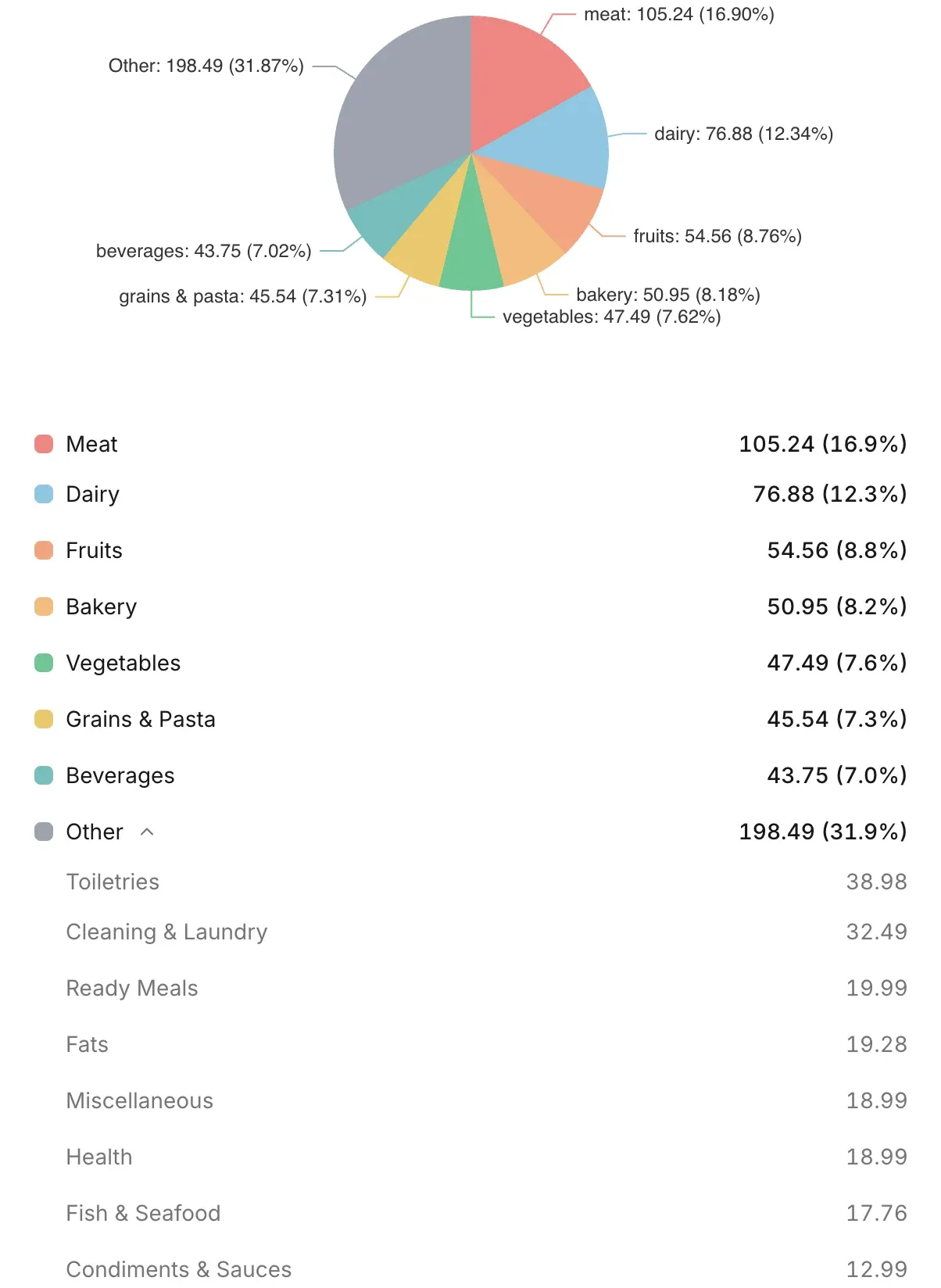
See exactly what percentage of your budget goes to produce, dairy, snacks, beverages, and more.
Weekly & monthly trends
Track how your spending changes week over week and month over month to spot seasonal patterns.
Top items by spend
Discover which individual items cost you the most over any time period.
Flexible filters
Combine category, store, and date filters to drill into the exact slice of spending you care about.
Store comparison view
See how your spending breaks down by store to know where your money goes.
Exportable reports
Download your spending data as CSV for your own spreadsheets or financial tools.
How it works
Scan your receipts
Upload receipts from any store to build your spending data.
Insights update automatically
Charts and breakdowns refresh as new receipts are added.
Spot patterns and adjust
Change next week's cart based on what this week taught you.
Who is this for?
Budget savers
Know down to the item what your grocery budget is actually funding.
Meal planners
Track what you actually buy versus what you planned to buy.
Households
See the full picture of household grocery spending in one place.
The full picture, not just a number.
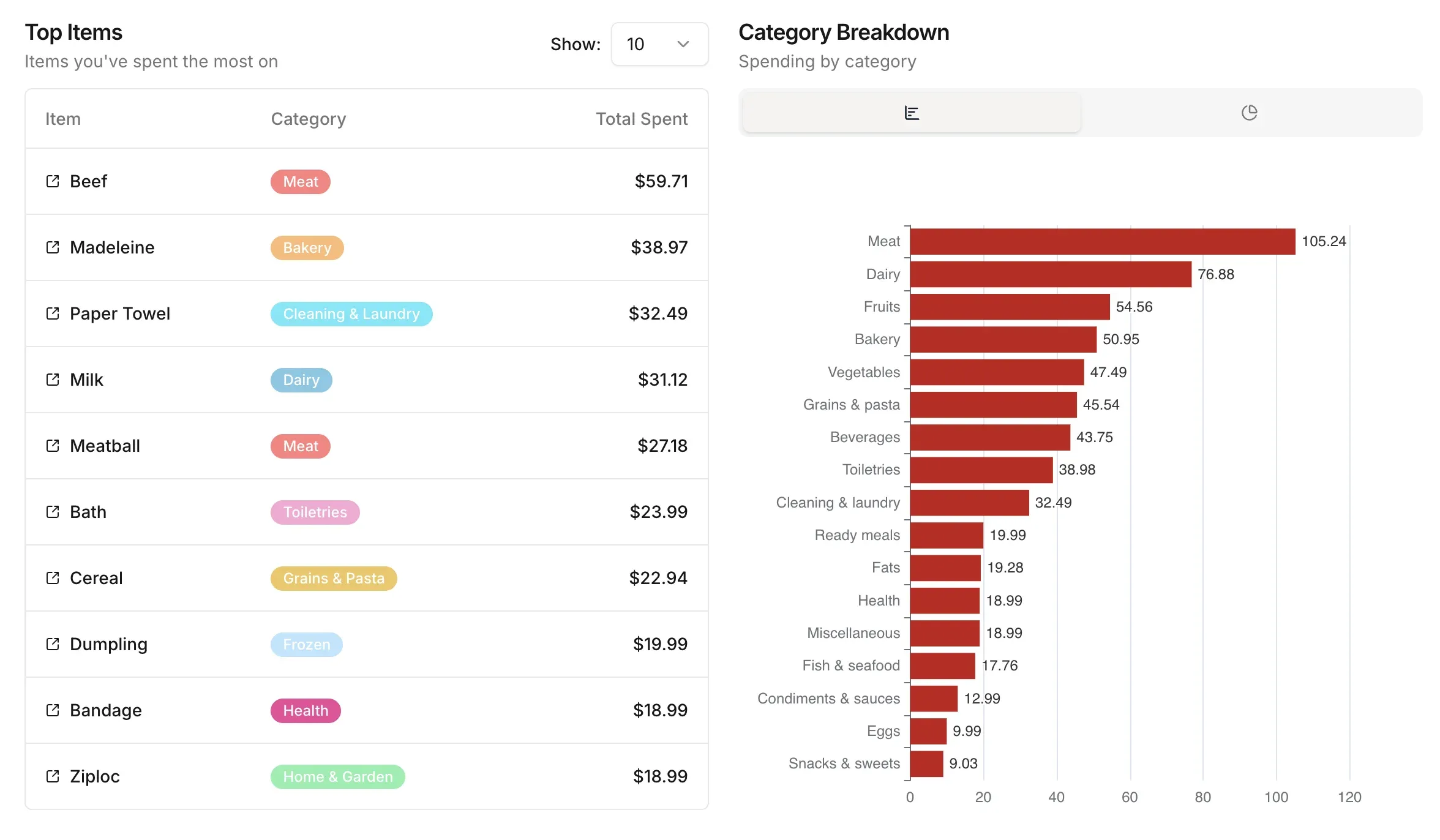
Most budgeting apps tell you how much you spent. Groceries Tracker shows you the shape of it. Break your spending down by category to see where the money actually goes. By store, to see who is taking the biggest slice of your grocery budget. By top items, so you know which specific products are pulling the most weight. Total, average, min, and max per period, so you can tell if this month was typical or an outlier.
Total Spend
Over selected period
Avg.
$310
Min
$263
Max
$357
Trips
6
Spending Trends
Spot the spikes before they become surprises.
Every period on the summary page comes with a simple comparison: how much more or less you spent than the same stretch before. A 14% jump in snack spending this month versus last is the kind of signal a raw total quietly hides. Catch the trend while you still have time to do something about it.
This month vs last month
Drill down to the exact question you have.
Pick a category, a store, and a date range. The entire page rewrites itself around your filter. Want to know how much your household spent on produce, only at Costco, over the last 90 days? Three clicks. Need the raw numbers for a spreadsheet or a tax filing? Download everything as a CSV. Your history, your format, no lock-in.
Total Spend
Produce at Costco · 90 days
Item
Category
Total Spent
FAQ
How far back does my spending data go?
Your data goes back to your very first scanned receipt. There is no limit on history.
Can I filter insights by category?
Yes. You can filter charts and breakdowns by any category, store, or custom date range.
Are insights updated in real time?
Insights update as soon as a new receipt is saved. Charts and totals reflect your latest data immediately.
Can I export my spending data?
Yes. You can export your full spending history as a CSV file for use in spreadsheets or other tools.
Does it work with shared groups?
Yes. Shared group members see combined spending insights, so the whole household is on the same page.