How Grocery Receipt Scanning Saves You Money
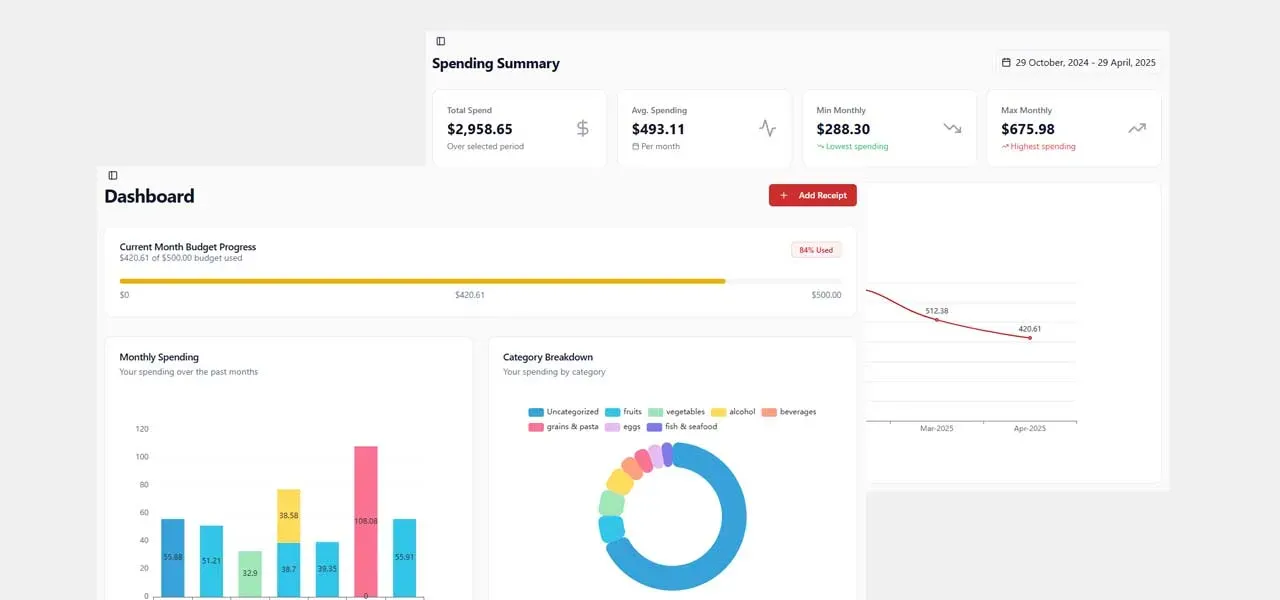
You get home from the grocery store, unpack the bags, shove the receipt in a drawer (or the trash), and move on with your life. Sound about right?
That little piece of paper has everything on it - every item, every price, every tax charge. It's a complete record of where your money just went. But nobody wants to sit down and type 30 line items into a spreadsheet. So the receipt disappears and the information disappears with it.
That's the problem a free grocery receipt scanner solves.
What Is a Grocery Receipt Scanner?
A grocery receipt scanner is an app that reads your grocery receipt -just from a photo -and pulls out every item, price, and quantity automatically. No manual entry. No spreadsheets. You take a picture, and the app does the rest.
Good ones go further than just reading the text. They categorize your purchases (meat, dairy, snacks, household, etc.), track your spending over time, and let you compare trips or months side by side.
Think of it as turning that crumpled receipt into actual, usable information about your spending.
Why Would I Need One?
Because your bank statement is lying to you. Well, not lying exactly -but it's hiding the truth behind one unhelpful line: "GROCERY - $163.42."
That tells you nothing. Was it an expensive cut of meat? Did the kids add snacks when you weren't looking? Did you buy cleaning supplies that inflated the total? You have no idea. And when you don't know what drove the number, you can't do anything about it.
A receipt scanner gives you the breakdown your bank won't. And once you have the breakdown, everything changes. You start noticing things:
- You're spending $45/month on drinks you barely think about
- Those "quick trips" for one or two things always turn into $35+
- You keep buying items you already have at home
- One category (usually snacks or prepared foods) is way higher than you thought
None of this is visible from a bank statement. All of it is visible from a scanned receipt.
How Grocery Receipt Analysis Actually Works
Modern receipt scanners read your receipt automatically. Here's what happens behind the scenes:
- You snap a photo. Doesn't need to be perfect -most scanners handle wrinkled, faded, or slightly crooked receipts just fine.
- The text is extracted. Every line item, price, quantity, tax, and total gets pulled from the image.
- Items are categorized. The scanner figures out that "BNL CHKN BRST" is boneless chicken breast and files it under meat. "LAYS CLASSIC" goes under snacks. And so on.
- You review and adjust. It's good, but not perfect. A solid app lets you fix anything that looks off in a couple of taps.
- Your data builds over time. After a few weeks, you've got a real spending picture -by category, by store, by month.
What Makes a Good Grocery Receipt Scanner
Not all receipt scanners are created equal. Some are built for expense reports. Some are built for cashback rewards. If you actually want to understand your grocery spending, look for these things:
- Grocery-specific categorization. Generic expense apps sort things into "Food" or "Shopping." That's useless. You need meat, dairy, produce, snacks, beverages, household -real categories that match how you actually shop.
- Item-level detail. If the app only records the receipt total, it's not helping. You need every line item.
- Spending history. Being able to look back at what you bought last week, last month, or three months ago. This is how you catch patterns.
- Household sharing. If more than one person in your home shops for groceries, everyone should see the same data. Otherwise you're only tracking half the picture.
- Editing. No scanner is perfect. The app should let you fix categories or item names easily.
How Groceries Tracker Handles Receipt Scanning
We built Groceries Tracker around this exact workflow. Scan your receipt after each shopping trip, and the app handles the rest.
Every item is extracted, categorized, and added to your spending history. You can see breakdowns by category, compare months, spot trends, and share everything with your household. If something is miscategorized, you fix it in two taps.
The whole point is that it takes almost no effort. You already have the receipt. You already have your phone. One photo and you're done.
The Emotional Side Nobody Talks About
Here's what surprised us when we started building this: the people who use receipt scanners don't just save money. They feel better.
There's a real anxiety that comes with not knowing where your money goes. That vague guilt after every grocery trip. The tension between partners when the bill is higher than expected but neither person knows why.
Scanning your receipts doesn't just give you data. It gives you peace of mind. When you can point to exactly where the money went, the guessing stops. The arguments stop. The stress drops.
It turns out clarity is worth a lot more than just dollars saved.
Want to try it yourself?
Our free grocery receipt scanner reads any receipt in seconds - no manual entry, no spreadsheets.
Try the free receipt scanner